
Photo Ready Logo
Photo Ready
PhotoReady AI style preview for A Study in Shadows on photoready.kaamkardo.com
PhotoReady | photoready.kaamkardo.com
Custom Creator Style

A Study in Shadows

Created by
@creator
#realistic cinematic portrait photography fashion
Freeper generation
Secure transactions and inputs
Outputs completed in under 15 seconds
Powered by Photo Ready Engine
Prompt Template
Free Access
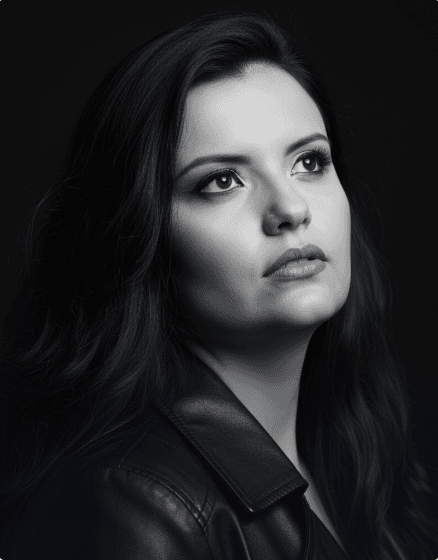
A high-impact black and white studio portrait, capturing a female figure with an introspective and pensive expression. The subject is photographed in a close-up that encompasses the face and upper chest, with her head tilted slightly back and her gaze directed upward and to the right, conveying a sense of dreaminess, hope, or deep contemplation. Her lips are slightly parted. She wears a dark leather jacket, the collar and shoulders of which are visible, adding a touch of edgy and timeless style to the portrait. Her hair is long, with soft, natural waves that fall over her shoulders, adding volume and movement to the composition. The texture of her hair is detailed, with light and dark streaks that stand out against the gradation of grays. The background is completely black and uniform, eliminating any distractions and focusing all attention on the subject's expression and the details of her face and hair. The lighting is dramatic and sculptural, low-key, using a single main light source from above and from the side to create sharp contrasts. This highlights the cheekbones, jawline, neck, and skin texture, while deep shadows add mystery and depth. A subtle glow is visible in the eyes, reflecting light and adding vibrancy to the look. Camera Settings: Captured with a prime portrait lens (e.g., 85mm or 100mm) on a full-frame camera, ideal for intimate, distortion-free close-ups. Aperture set between f/1.8 and f/2.2 for an extremely shallow depth of field (creamy bokeh), which focuses intensely on the eyes and face, leaving the rest softly blurred. ISO 100-200 for maximum black-and-white image quality and no noise. Shutter speed from 1/160s to 1/250s to ensure sharpness. Studio lighting with a strip box or beauty dish with a grid as the main light, positioned above and in front of the subject to create dramatic, sculptural lighting, without fill light to maintain strong contrasts. Instructions for the "nano banana": "Please use the user's reference image to capture and apply all of their facial features, facial structure, eye color, skin tone, and hair style and texture with maximum fidelity. The goal is to create a version of the user in this black and white portrait, with the same pose, expression, and dramatic lighting. The dark leather jacket and the uniform black background should be rendered as described, creating a perfect fusion between the user's identity and the aesthetic of the image."

Prompt explanation

The prompt anchors the model around realistic cinematic portrait photography fashion, then narrows the output with outfit, background, lighting, pose, expression, and camera instructions. The most important variables to preserve are face identity, realistic skin texture, clear eyes, natural proportions, and the professional portrait lens with realistic depth of field look.

Editable variables

OutfitBackgroundLightingPoseExpressionCamera

Expected output

A realistic realistic cinematic portrait photography fashion image with soft, realistic portrait lighting, a simple background that keeps attention on the face, a confident, approachable expression, and clear facial identity.

Common mistakes

  • Using a blurry or heavily cropped source photo.
  • Mixing formal and casual style instructions in the same prompt.
  • Adding too many props or background details.

Tips

  • Keep the clean, polished clothing that matches the intended use direction consistent with the final use case.
  • Preserve the soft, realistic portrait lighting and professional portrait lens with realistic depth of field terms when editing.
  • Use one clear face reference for the most reliable identity match.

Visual evidence for this style

Generated example for A Study in Shadows

Generated example

A Study in Shadows is a creator-made PhotoReady style for realistic cinematic portrait photography fashion. It works best with a clear face photo, natural lighting, and a simple source image. Use it to copy the prompt or generate polished AI photos directly on PhotoReady.

Background detail for A Study in Shadows

Background detail

a simple background that keeps attention on the face

LinkedIn preview crop for A Study in Shadows

LinkedIn preview crop

a natural pose with clear face visibility with a confident, approachable expression.

About this style

A Study in Shadows is a realistic cinematic portrait photography fashion style built for realistic cinematic portrait photography fashion images, profile photos, and creator visuals. It combines clean, polished clothing that matches the intended use, a simple background that keeps attention on the face, soft, realistic portrait lighting, a natural pose with clear face visibility, and a confident, approachable expression so the generated image feels intentional rather than random. The goal is not only to copy a prompt, but to understand the visual system behind the output.

This style is especially useful for professionals because it keeps the result focused on credibility, facial clarity, and repeatable framing. The professional portrait lens with realistic depth of field direction helps the image look closer to a real portrait session, while the background and lighting choices reduce distractions that can weaken a profile photo, resume image, creator bio, or portfolio thumbnail.

For best results, start with a sharp source image where the face is unobstructed and the head is not heavily cropped. Keep the outfit and background aligned with the final use case: more formal for LinkedIn, resumes, company pages, and founder bios; softer and more expressive for creator profiles, social media, and personal branding.

Structured style metadata

Category
Realistic Cinematic Portrait Photography Fashion
Use case
realistic cinematic portrait photography fashion images, profile photos, and creator visuals

Best use cases for A Study in Shadows

A Study in Shadows is a creator-made PhotoReady style for realistic cinematic portrait photography fashion. It works best with a clear face photo, natural lighting, and a simple source image. Use it to copy the prompt or generate polished AI photos directly on PhotoReady.

Who should use it

This style fits professionals who need a polished image for realistic cinematic portrait photography fashion images, profile photos, and creator visuals. It is useful when the photo needs to look credible, current, and easy to reuse across professional profiles.

Why this works

The combination of soft, realistic portrait lighting, a simple background that keeps attention on the face, and a confident, approachable expression makes the final image readable at small profile-photo sizes while still feeling realistic at full size.

Outfit guide

Use clean, polished clothing that matches the intended use. Avoid clothing that fights the style direction, especially busy patterns, oversized logos, or colors that clash with the background.

Background guide

The best background is a simple background that keeps attention on the face. It should support the subject without making the final image look staged, crowded, or overly decorative.

Camera and expression guide

Keep professional portrait lens with realistic depth of field, a natural pose with clear face visibility, and a confident, approachable expression. These details help the output read like a real portrait rather than a generic AI image.

Common questions

Is this style free?

Yes. You can copy this style prompt directly from the page.

What image works best?

Use a clear portrait with good lighting, an unobstructed face, and minimal blur for the most realistic result.

Can I adapt the prompt?

Yes. Keep the core camera, lighting, and mood terms, then swap details such as outfit, background, or occasion.

Which industries fit this style?

It works best for professionals, and can be adapted for adjacent roles by changing outfit, background, and expression details.

What should I avoid?

Avoid low-resolution uploads, covered faces, extreme filters, crowded backgrounds, and instructions that conflict with the style metadata.

Can this be used for LinkedIn?

Yes, especially when the outfit, background, expression, and crop match the professional audience you want to reach.

Related guides