
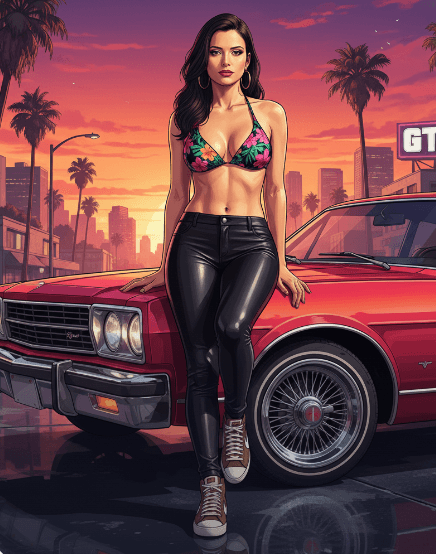
GTA 5
Visual evidence for this style
Generated example
GTA 5 is a creator-made PhotoReady style for cinematic cartoon fantasy. It works best with a clear face photo, natural lighting, and a simple source image. Use it to copy the prompt or generate polished AI photos directly on PhotoReady.
Background detail
a simple background that keeps attention on the face
LinkedIn preview crop
a natural pose with clear face visibility with a confident, approachable expression.
About this style
GTA 5 is a cinematic cartoon fantasy style built for cinematic cartoon fantasy images, profile photos, and creator visuals. It combines clean, polished clothing that matches the intended use, a simple background that keeps attention on the face, soft, realistic portrait lighting, a natural pose with clear face visibility, and a confident, approachable expression so the generated image feels intentional rather than random. The goal is not only to copy a prompt, but to understand the visual system behind the output.
This style is especially useful for professionals because it keeps the result focused on credibility, facial clarity, and repeatable framing. The professional portrait lens with realistic depth of field direction helps the image look closer to a real portrait session, while the background and lighting choices reduce distractions that can weaken a profile photo, resume image, creator bio, or portfolio thumbnail.
For best results, start with a sharp source image where the face is unobstructed and the head is not heavily cropped. Keep the outfit and background aligned with the final use case: more formal for LinkedIn, resumes, company pages, and founder bios; softer and more expressive for creator profiles, social media, and personal branding.
Structured style metadata
Best use cases for GTA 5
GTA 5 is a creator-made PhotoReady style for cinematic cartoon fantasy. It works best with a clear face photo, natural lighting, and a simple source image. Use it to copy the prompt or generate polished AI photos directly on PhotoReady.
Who should use it
This style fits professionals who need a polished image for cinematic cartoon fantasy images, profile photos, and creator visuals. It is useful when the photo needs to look credible, current, and easy to reuse across professional profiles.
Why this works
The combination of soft, realistic portrait lighting, a simple background that keeps attention on the face, and a confident, approachable expression makes the final image readable at small profile-photo sizes while still feeling realistic at full size.
Outfit guide
Use clean, polished clothing that matches the intended use. Avoid clothing that fights the style direction, especially busy patterns, oversized logos, or colors that clash with the background.
Background guide
The best background is a simple background that keeps attention on the face. It should support the subject without making the final image look staged, crowded, or overly decorative.
Camera and expression guide
Keep professional portrait lens with realistic depth of field, a natural pose with clear face visibility, and a confident, approachable expression. These details help the output read like a real portrait rather than a generic AI image.
Common questions
Is this style free?
Yes. You can copy this style prompt directly from the page.
What image works best?
Use a clear portrait with good lighting, an unobstructed face, and minimal blur for the most realistic result.
Can I adapt the prompt?
Yes. Keep the core camera, lighting, and mood terms, then swap details such as outfit, background, or occasion.
Which industries fit this style?
It works best for professionals, and can be adapted for adjacent roles by changing outfit, background, and expression details.
What should I avoid?
Avoid low-resolution uploads, covered faces, extreme filters, crowded backgrounds, and instructions that conflict with the style metadata.
Can this be used for LinkedIn?
Yes, especially when the outfit, background, expression, and crop match the professional audience you want to reach.