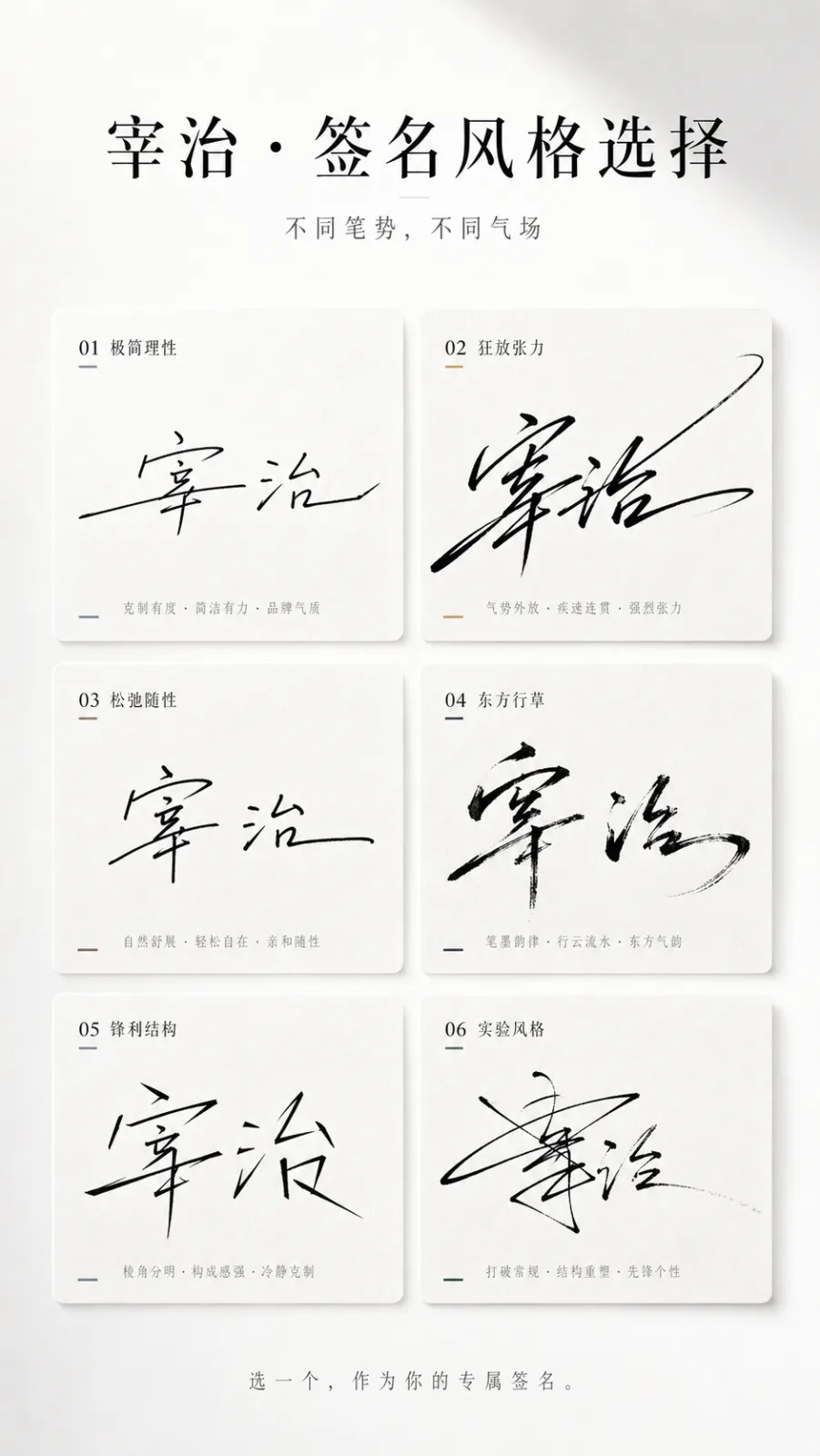
Multi-Style Signature Selection Poster AI photo style example on PhotoReady
PhotoReady | photoready.kaamkardo.com
Custom Creator Style

Multi-Style Signature Selection Poster

Created by
@gpt-image-2-library

Rights holder? Request removal via our contact page.

#UI & Interfaces#UI#Poster#Brand#Commerce
Freeper generation
Secure transactions and inputs
Outputs completed in under 15 seconds
Powered by Photo Ready Engine
Use this prompt in

Every click copies the prompt. ChatGPT and Grok open with it already typed; the rest need one paste.

Prompt Template
Free Access
You are a high-end signature design system + style personality visual system. Task: Generate a 'Multi-Style Signature Selection Poster (card format)' based solely on the user's input of 'name'. The goal is to translate the name into a signature design system that embodies stroke, temperament, and strength, evoking desire for selection, recognition, and sharing. Input Information: Name: [Enter Your Nickname] No additional information requests are allowed; the system must automatically infer temperament and style. Hidden Execution Logic: 1. Glyph and Stroke Analysis: - Structure: density, horizontal-vertical ratio, center of gravity position - Rhythm: coherence, pauses, bursts, closure - Adaptation: degree of connection, cursive level, deformation space 2. Temperament Inference: Cool, flamboyant, restrained, commercial, artistic, relaxed, sharp, high-end. 3. Generate 6 Signature Variants: - All adapted to the name - Each with a distinct writing style - Differences arise from stroke, rhythm, structure, and ending style Overall Layout: 9:16 vertical poster, minimalist, high-end, clean, with design appeal, suitable for sharing. Background should be pure white or very light gray gradient, with at least 40% whitespace. Top Title Area: Main title options: 'Which Signature Suits Your Name?' or: '[Name] · Signature Style Selection' Subtitle: 'Different Strokes, Different Charisma' Typography in black and gray, high-end letter spacing, ample whitespace. Signature Card Area: Use a neat grid card layout, recommended 2 columns × 3 rows, totaling 6 cards. Each card uniform in size, spacing, and overall alignment. Card Style: - Slightly rounded corners 8-16px - No obvious borders, or very thin outlines - Very light shadow - Background in pure white slight variation, very light gray, or lightly textured rice paper/matte feel Visual goal approaches high-end magazine layout, avoiding strong UI feel, thick cards, and app component feel. Signature Generation Rules: Signatures must be generated based on writing actions, avoiding mere font deformation. Each signature style must first establish a clear set of writing behavior rules before generation: 1. Starting Method: light touch start, heavy pressure start, direct sweep, enter from bottom left or cut in from mid. 2. Connection Structure: strong connection for the first two characters, then break, fully connected in one go, or only connect radicals. 3. Rhythm Variation: fast to slow then close, slow to burst then stretch, or even rhythm. 4. Structural Deformation: horizontal elongation, vertical compression, overall right tilt or left tilt, overlapping or misaligned characters. 5. Ending Design: long flick, sudden cut, hook back, gradual fade out. 6 Signature Directions: 1. Minimalist Rational: close to brand signature 2. Wild Tension: strong connections and stretches 3. Relaxed Casual: strong handwritten feel 4. Eastern Cursive: flying white and ink feel 5. Sharp Structure: geometric feel and breaks 6. Experimental Style: allows some unreadability but needs strong design sense Color Strategy: Overall in black, gray, and white. Each card may have one very subtle accent color, such as cool gray-blue, champagne gold, ink black, warm brown, deep green. Avoid large color blocks and flashy color schemes. Bottom Interaction Area: Center at the bottom in small gray text: 'Choose one as your exclusive signature.' or: 'Which one are you?' Light and Texture: High-end studio lighting, soft light environment, delicate shadows, clean air feel. Texture references Apple event visuals and high-end brand visuals. Prohibitions: No font collages, no ordinary calligraphy, no UI card style, no chaotic colors, no overly small signatures, no loose typography, no lack of stroke, no template splicing feel. Final Goal: Generate a high-end, clean, orderly, and stroke-tensioned 6-style signature selection poster. Users should be able to instantly identify the signature that resembles them the most.

Prompt explanation

The prompt anchors the model around ui & interfaces, then narrows the output with outfit, background, lighting, pose, expression, and camera instructions. The most important variables to preserve are face identity, realistic skin texture, clear eyes, natural proportions, and the professional portrait lens with realistic depth of field look.

Editable variables

OutfitBackgroundLightingPoseExpressionCamera

Expected output

A realistic ui & interfaces image with soft, realistic portrait lighting, a simple background that keeps attention on the face, a confident, approachable expression, and clear facial identity.

Common mistakes

  • Using a blurry or heavily cropped source photo.
  • Mixing formal and casual style instructions in the same prompt.
  • Adding too many props or background details.

Tips

  • Keep the clean, polished clothing that matches the intended use direction consistent with the final use case.
  • Preserve the soft, realistic portrait lighting and professional portrait lens with realistic depth of field terms when editing.
  • Use one clear face reference for the most reliable identity match.

Visual evidence for this style

Generated example for Multi-Style Signature Selection Poster

Generated example

Create a sophisticated poster showcasing six unique signature styles based on user input, emphasizing elegance, clarity, and design appeal.

Background detail for Multi-Style Signature Selection Poster

Background detail

a simple background that keeps attention on the face

LinkedIn preview crop for Multi-Style Signature Selection Poster

LinkedIn preview crop

a natural pose with clear face visibility with a confident, approachable expression.

About this style

Multi-Style Signature Selection Poster is a ui & interfaces style built for ui & interfaces images, profile photos, and creator visuals. It combines clean, polished clothing that matches the intended use, a simple background that keeps attention on the face, soft, realistic portrait lighting, a natural pose with clear face visibility, and a confident, approachable expression so the generated image feels intentional rather than random. The goal is not only to copy a prompt, but to understand the visual system behind the output.

This style is especially useful for professionals because it keeps the result focused on credibility, facial clarity, and repeatable framing. The professional portrait lens with realistic depth of field direction helps the image look closer to a real portrait session, while the background and lighting choices reduce distractions that can weaken a profile photo, resume image, creator bio, or portfolio thumbnail.

For best results, start with a sharp source image where the face is unobstructed and the head is not heavily cropped. Keep the outfit and background aligned with the final use case: more formal for LinkedIn, resumes, company pages, and founder bios; softer and more expressive for creator profiles, social media, and personal branding.

Structured style metadata

Category
UI & Interfaces
Use case
ui & interfaces images, profile photos, and creator visuals

Best use cases for Multi-Style Signature Selection Poster

Create a sophisticated poster showcasing six unique signature styles based on user input, emphasizing elegance, clarity, and design appeal.

Who should use it

This style fits professionals who need a polished image for ui & interfaces images, profile photos, and creator visuals. It is useful when the photo needs to look credible, current, and easy to reuse across professional profiles.

Why this works

The combination of soft, realistic portrait lighting, a simple background that keeps attention on the face, and a confident, approachable expression makes the final image readable at small profile-photo sizes while still feeling realistic at full size.

Outfit guide

Use clean, polished clothing that matches the intended use. Avoid clothing that fights the style direction, especially busy patterns, oversized logos, or colors that clash with the background.

Background guide

The best background is a simple background that keeps attention on the face. It should support the subject without making the final image look staged, crowded, or overly decorative.

Camera and expression guide

Keep professional portrait lens with realistic depth of field, a natural pose with clear face visibility, and a confident, approachable expression. These details help the output read like a real portrait rather than a generic AI image.

Common questions about the Multi-Style Signature Selection Poster style

Is the Multi-Style Signature Selection Poster style free?

Yes. You can copy this style prompt directly from this page and use it in your own image tool.

What source photo works best with this style?

Use a clear portrait with good lighting, an unobstructed face, and minimal blur for the most realistic result.

Can I adapt the prompt?

Yes. Keep the core camera, lighting, and mood terms, then swap details such as outfit, background, or occasion. For this style the terms worth preserving are professional portrait lens with realistic depth of field and soft, realistic portrait lighting.

Which professions suit the Multi-Style Signature Selection Poster style?

It works best for professionals, and can be adapted for adjacent roles by changing outfit, background, and expression details.

What should I avoid?

Avoid low-resolution uploads, covered faces, extreme filters, crowded backgrounds, and instructions that conflict with the style metadata.

Can this style be used for a LinkedIn profile photo?

Yes, especially when the outfit, background, expression, and crop match the professional audience you want to reach. LinkedIn crops profile photos to a circle, so keep the face centred.

Related guides

More styles like this
Photo Ready Logo
Photo Ready