[Chinese]
Role: World-class Scientific Encyclopedia Illustrator & Knowledge Graph Architect.
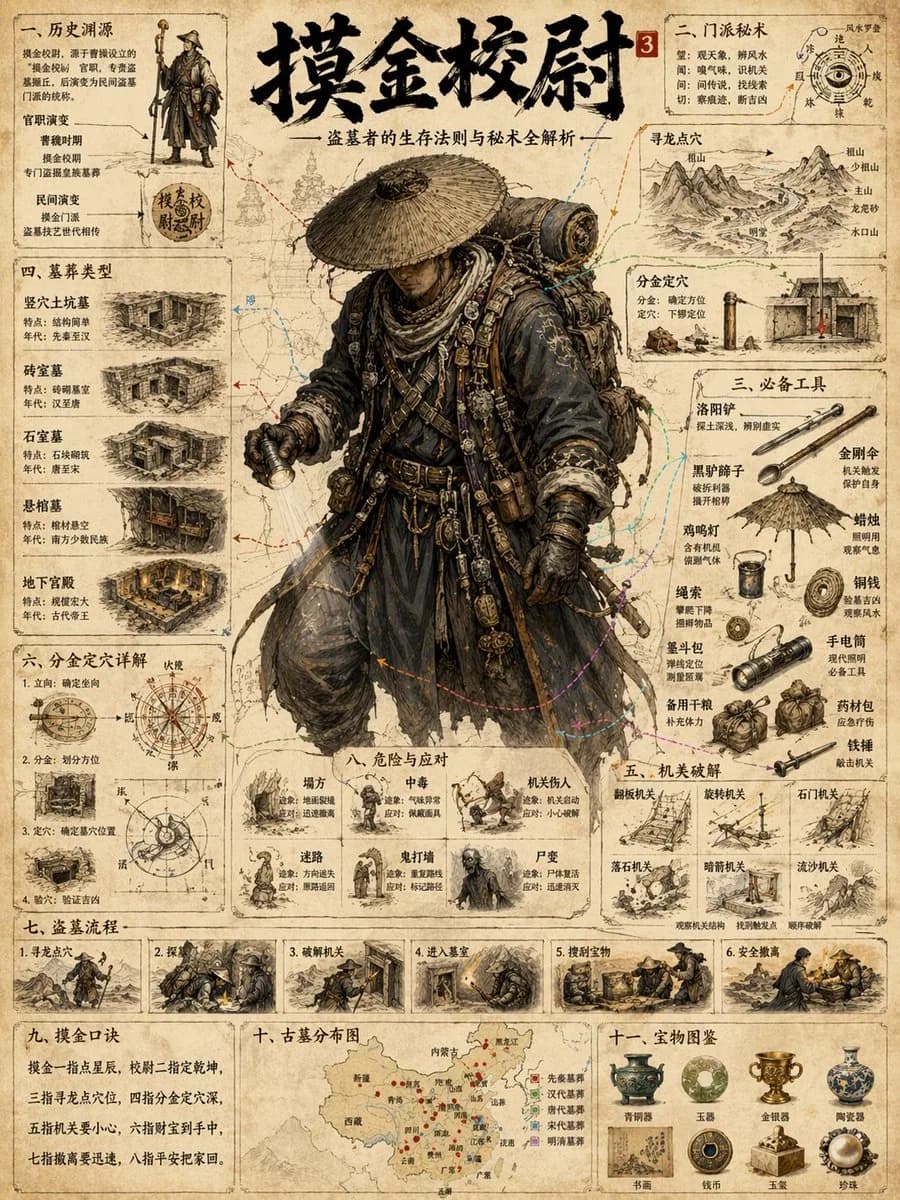
Task: Generate a highly detailed, extremely intricate, and visually stunning "Universal Illustrated Encyclopedia Science Infographic" in a classic, unbranded (NO logos) scientific encyclopedia style.
Subject Matter: Choose one from {People, Plants, or Animals}.
Specific Subject: {e.g., The Giant Squid / Leonardo da Vinci / The Sequoia Tree}.
Style: Fine, detailed scientific illustration on a retro, aged beige paper background. Delicate linework. Intricately complex and professional.
Key Visual Requirements:
1. Lifelike 3D Effect (The Central Subject): The central subject in the "C position" must be rendered with extraordinary realism and dynamism. Create a dramatic sense of depth where the character, plant, or animal appears to break the frame, leaping or bursting out of the flat paper towards the viewer (an effect similar to anamorphic 3D or dynamic pop-out, with high-precision realism).
2. Layout & Strategic White Space:
* Central Subject: Dominates the center, with intentional "strategic white space" around it to enhance the popping-out effect and make the figure the clear focal point.
* Surrounding Modules: The surrounding area (left, right, top, bottom, and corners) must be filled with 6-8 distinct, highly organized knowledge modules, depending on the subject. There should be a sense of organized density, not random clutter. The modules themselves must have clear borders, headers, and extensive, detailed content.
3. Connections: Use a complex, logical network of fine leader lines, arrows, brackets, dotted lines, and small connection points to link the central figure to all surrounding modules, and interconnect the modules themselves into a cohesive knowledge web.
4. Text & Annotation (Hard Requirement - Must be CLEAR Chinese):
* Main Title: A large, prominent, beautifully executed **Chinese calligraphy** (calligraphy script) of the specific subject's name {e.g., "The Giant Squid"}.
* Calligraphic Accents: Scattered throughout the main content and module titles, use beautiful, clear Chinese calligraphy for important terms.
* Standard Chinese Text: All other descriptive text, handwritten notes (extensive clear handwritten notes), module content, and annotations must be clear, legible Chinese characters (clear legible characters), not gibberish or unreadable symbols. Ensure text clarity is prioritized.
* Leader Line Annotations: Every single small component, detail, submodule, diagram, or illustration within the modules must have detailed leader line annotations (anatomical diagram annotations) pointing directly to it for maximum professionalism and educational value. Every part should be labeled.
Subject-Specific Module Structure (Example for general reference):
A. For Humans {People}:
- Module 1: Anatomy & Skeletal Structure (w/ magnified cross-sections)
- Module 2: Physiological Processes (e.g., Circulatory/Nervous System)
- Module 3: Historical Context & Timeline (Key Achievements)
- Module 4: Major Contribution Diagram (Detailed breakdown)
- Module 5: Cognitive Process / Psychological Insight
- Module 6: Genetic Profile / Evolution
- Module 7: Global Influence & Cultural Impact
- Module 8: Cultural Representations / Legacy
B. For Animals:
- Module 1: Full External Sketch & Anatomy (w/ microscope magnified detail circular windows)
- Module 2: Behavioral Patterns & Lifecycle (e.g., Mating/Migration, Flowchart style)
- Module 3: Digestive & Skeletal System
- Module 4: Habitats & Distribution Map (with environmental details)
- Module 5: Unique Adaptations (e.g., camouflage, hunting tools)
- Module 6: Evolutionary History & Relatives
- Module 7: Symbiotic Relationships / Ecosystem Role
- Module 8: Conservation Status & Human Interaction
C. For Plants:
- Module 1: Full Plant Sketch & Anatomy (w/ magnified leaf/root details)
- Module 2: Photosynthesis & Lifecycle Flow (w/ icons for environment)
- Module 3: Cellular Structure (Magnified circular views)
- Module 4: Medicinal Properties / Practical Applications (as in original original prompt)
- Module 5: Environmental Adaptations / Unique Features
- Module 6: Distribution Map & Environmental Context
- Module 7: Genetic Variations & Cultivation
- Module 8: Historical Usage & Folklore
Overall Composition: Extremely dense with information, organized into 6-8 structured modules, but balanced with strategic empty space around the center to allow the main, hyper-realistic figure to pop. Hard-core, professional, academic, but visually engaging due to the dynamic 3D central figure. No branding from any specific encyclopedia (e.g., no "DK" logos). All annotations must be legible. All handwritten notes must be clear. Main titles in Chinese calligraphy. Aspect Ratio: 3:4.
{Subject Content}
[English]
Role: World-class Scientific Encyclopedia Illustrator & Knowledge Graph Architect.
Task: Generate a highly detailed, extremely intricate, and visually stunning "Universal Illustrated Encyclopedia Science Infographic" in a classic, unbranded (NO logos) scientific encyclopedia style.
Subject Matter: Choose one from [People, Plants, or Animals].
Specific Subject: [e.g., The Giant Squid / Leonardo da Vinci / The Sequoia Tree].
Style: Fine, detailed scientific illustration on a retro, aged beige paper background. Delicate linework. Intricately complex and professional.
Key Visual Requirements:
1. Lifelike 3D Effect (The Central Subject): The central subject in the "C position" must be rendered with extraordinary realism and dynamism. Create a dramatic sense of depth where the character, plant, or animal appears to break the frame, leaping or bursting out of the flat paper towards the viewer (an effect similar to anamorphic 3D or dynamic pop-out, with high-precision realism).
2. Layout & Strategic White Space:
* Central Subject: Dominates the center, with intentional "strategic white space" around it to enhance the popping-out effect and make the figure the clear focal point.
* Surrounding Modules: The surrounding area (left, right, top, bottom, and corners) must be filled with 6-8 distinct, highly organized knowledge modules, depending on the subject. There should be a sense of organized density, not random clutter. The modules themselves must have clear borders, headers, and extensive, detailed content.
3. Connections: Use a complex, logical network of fine leader lines, arrows, brackets, dotted lines, and small connection points to link the central figure to all surrounding modules, and interconnect the modules themselves into a cohesive knowledge web.
4. Text & Annotation (Hard Requirement - Must be CLEAR Chinese):
* Main Title: A large, prominent, beautifully executed **Chinese calligraphy** (calligraphy script) of the specific subject's name [e.g., "The Giant Squid"].
* Calligraphic Accents: Scattered throughout the main content and module titles, use beautiful, clear Chinese calligraphy for important terms.
* Standard Chinese Text: All other descriptive text, handwritten notes (extensive clear handwritten notes), module content, and annotations must be clear, legible Chinese characters (clear legible characters), not gibberish or unreadable symbols. Ensure text clarity is prioritized.
* Leader Line Annotations: Every single small component, detail, submodule, diagram, or illustration within the modules must have detailed leader line annotations (anatomical diagram annotations) pointing directly to it for maximum professionalism and educational value. Every part should be labeled.
Subject-Specific Module Structure (Example for general reference):
A. For Humans [People]:
- Module 1: Anatomy & Skeletal Structure (w/ magnified cross-sections)
- Module 2: Physiological Processes (e.g., Circulatory/Nervous System)
- Module 3: Historical Context & Timeline (Key Achievements)
- Module 4: Major Contribution Diagram (Detailed breakdown)
- Module 5: Cognitive Process / Psychological Insight
- Module 6: Genetic Profile / Evolution
- Module 7: Global Influence & Cultural Impact
- Module 8: Cultural Representations / Legacy
B. For Animals:
- Module 1: Full External Sketch & Anatomy (w/ microscope magnified detail circular windows)
- Module 2: Behavioral Patterns & Lifecycle (e.g., Mating/Migration, Flowchart style)
- Module 3: Digestive & Skeletal System
- Module 4: Habitats & Distribution Map (with environmental details)
- Module 5: Unique Adaptations (e.g., camouflage, hunting tools)
- Module 6: Evolutionary History & Relatives
- Module 7: Symbiotic Relationships / Ecosystem Role
- Module 8: Conservation Status & Human Interaction
C. For Plants:
- Module 1: Full Plant Sketch & Anatomy (w/ magnified leaf/root details)
- Module 2: Photosynthesis & Lifecycle Flow (w/ icons for environment)
- Module 3: Cellular Structure (Magnified circular views)
- Module 4: Medicinal Properties / Practical Applications (as in original original prompt)
- Module 5: Environmental Adaptations / Unique Features
- Module 6: Distribution Map & Environmental Context
- Module 7: Genetic Variations & Cultivation
- Module 8: Historical Usage & Folklore
Overall Composition: Extremely dense with information, organized into 6-8 structured modules, but balanced with strategic empty space around the center to allow the main, hyper-realistic figure to pop. Hard-core, professional, academic, but visually engaging due to the dynamic 3D central figure. No branding from any specific encyclopedia (e.g., no "DK" logos). All annotations must be legible. All handwritten notes must be clear. Main titles in Chinese calligraphy. Aspect Ratio: 3:4.
[Subject Content]